
Dear Colleagues,
ORA is pleased to announce the release of an updated version of the RAPID Closeout Tool (version dated 8/6/2026). Please download the latest version of the tool, available in the ORA Online Resource Center.
This release includes the following enhancements and updates:
- Corrected the standalone UCPath Admin Salary Report to ensure accurate data is displayed.
- Added instructions to the Closeout Checklist detailing how to include Multi-Campus Agreement (MCA) appropriation and expenditures.
- Adds the FY26-27 unallowable Composite Benefit Rates (CBR) to the Training Grant – Postdoc Allowable/Unallowable Benefits tab (see ORA News Email “NIH NRSA Grants: Unallowable Benefits for FY26-27” dated 7/1/2026 for more details).
- Renamed the UCPath ERS Detail Report (11/12 Academics and Non-Academics) report to UCPath Derived Effort Report. This report extracts payroll data from ODS and is intended to assist in comparing actual effort to committed effort in the proposal. The derived effort percentage in the report reflects data from the UCPath labor ledger.
- Renamed the UCPath ERS Detail Report (9/12 Academics) to “Do Not Use” due to data accuracy issues. Users should instead utilize the UCPath Derived Effort Report.
- Enhanced the UCPath ECC Payroll Detail Report by adding a new Effort/Hours column.
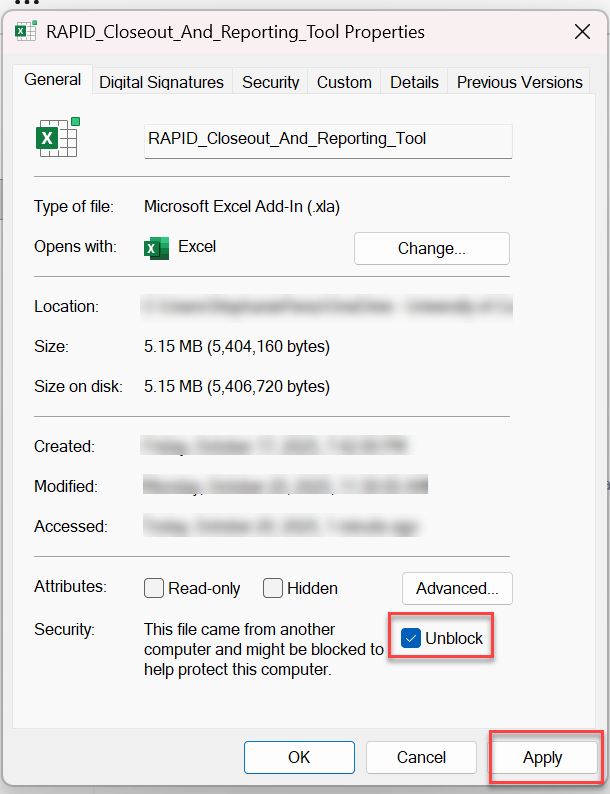
Before the RAPID Closeout Tool can be used with Excel, the .xla add-in file must be unblocked by following the steps below. Refer to the installation instructions that are available with the RAPID Closeout Tool download for more details.
- Right-click the file named RAPID_Closeout_And_Reporting_Tool and select Properties
- At the bottom of the General tab, click the Unblock button or check the Unblock checkbox
- Click the Apply button, then the OK button
If you have any questions about this new RAPID Tool version, contact your EFM accountant.
Thank you,
Katie Cadle, Assistant Director
Extramural Fund Management